Skip to content
Fold & Ferry

Decisions & how-to · Guides

How to organize travel documents

Two rules do almost all the work: everything that proves who you are lives in one container that never changes, and everything that proves what you booked exists twice - once on your phone and once on paper.

By Stephen V.Updated How we research
#ad

We earn a commission when you buy through our Amazon links, at no extra cost to you. It never affects our rankings, and we say so when the cheaper product is the better buy. How this works.

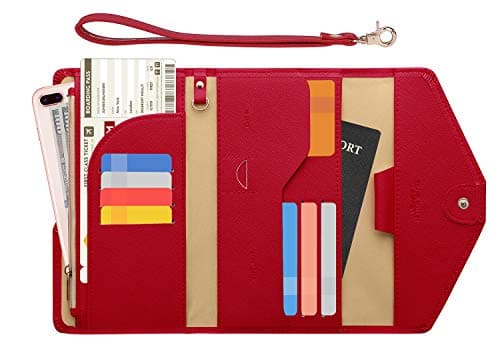
The system is two rules. First, everything that proves who you are goes in one container that lives in the same place for the whole trip - passport, licence, trusted traveler card, visas - and that container never goes in checked baggage. Second, everything that proves what you booked exists in two forms, on your phone and on paper, with only the first day printed. For one person the container to buy is the ZOPPEN Ver.5 travel wallet; for a family it is the tomtoc four-passport holder.

Separate identity from itinerary - everything follows from that

Almost every travel-document mess comes from putting two different kinds of paper in the same place. They have opposite properties.

Identity documents are few, irreplaceable, rarely needed and catastrophic to lose. You want them in one fixed, protected place that you open two or three times a trip. Itinerary documents are many, replaceable, needed constantly and trivial to lose. You want those in a reachable outer pocket you can get at while standing in a queue with a bag on your shoulder.

Put both in the same wallet and you get the familiar failure: the passport comes out and goes down on a check-in desk six times a day because the boarding pass was behind it. One container, two zones - or better, two containers.

What TSA actually accepts as identification

Worth knowing before you optimise a wallet around the wrong card. TSA states that adult passengers 18 and older must show valid identification at the checkpoint, that the list of acceptable IDs is subject to change without notice, and that travelers should check the list again before travelling. The list includes state-issued REAL ID-compliant driving licences or identification cards, enhanced driving licences and enhanced identification cards, certain mobile driving licences from approved states, US passports and passport cards, DHS trusted traveler cards (Global Entry, NEXUS, SENTRI, FAST), Department of Defense IDs including dependants', permanent resident cards, border crossing cards, tribal photo IDs, HSPD-12 PIV cards, foreign government-issued passports, Canadian provincial driving licences, TWIC cards, employment authorization cards, merchant mariner credentials and Veteran Health Identification Cards. TSA also notes that a temporary driving licence is not acceptable.

The practical consequences for your wallet: the card you rely on has to be on that list, a temporary licence will not do, and if your licence is not REAL ID-compliant the simplest fix is to carry the passport domestically as well. Check the list yourself before each trip - we are quoting it as fetched on 2026-10-11 and TSA says explicitly that it changes.

What to look for in a document container

  • Enough passport pockets for your party. This is the only hard requirement and the one people get wrong. One pocket is a solo wallet; four is a family holder. A family trying to share a solo wallet ends up with loose passports.
  • Card slots, counted. Count your actual cards - ID, two bank cards, transit, insurance, loyalty - and buy a wallet with that many slots plus one. Cards that do not have a slot live loose, and loose is how things go missing.
  • Water resistance. The realistic way to lose a passport is not theft; it is a bottle leaking in a bag. This is the spec that actually earns its place.
  • A strap, a tether or a tracker slot. Loss, not theft, is the dominant risk. A wrist strap stops you walking away from a desk; an AirTag slot tells you where the wallet went.
  • A separate outer sleeve for itinerary paper. So the passport is not what you handle every time you need a boarding pass.
  • Treat RFID blocking as a free extra. Every holder in this category claims it, almost none name a standard, and no listing publishes an independent test. Buy a wallet for the layout and the fabric and take the RFID claim as a bonus you cannot verify. We make the same point on our document organizer roundup.

Where each document goes

DocumentWhere it livesBackup
PassportTravel wallet, on your person or in your personal itemPhoto of the data page, offline and in the cloud
Driving licence or state IDTravel wallet card slotPhoto of both sides
Trusted traveler cardTravel wallet card slotKnown Traveler Number saved in notes
Visas and entry permitsTravel wallet, with the passportPhoto plus the issuing reference number
Boarding passesPhone wallet, plus printed for day one onlyAirline app and the confirmation email
Hotel confirmationsPhone, with the first night printedEmail, and the address written down
Travel insurancePhone, with the policy number memorablePolicy number and the 24-hour line in your contacts
Vaccination or health recordsTravel wallet if a paper copy is requiredPhoto
Spare bank cardSeparate from the wallet - a different bag entirelyBank app, and the lost-card number saved offline
Car hire voucher and licence endorsementPhone, printed if hiring on arrivalEmail confirmation

The digital half, done properly

Photographs of documents are only useful if you can reach them when the situation is bad, and bad situations involve a dead phone, no signal or a stolen bag. So store them twice: once in your phone's offline storage, where they open with no data connection, and once in a web-accessible account you could log into from a hotel computer or a stranger's laptop. One copy in a notes app you cannot reach offline is not a backup.

The one thing worth writing on actual paper and keeping separately from your phone and your wallet: the address of your first night's accommodation, your insurance policy number and the emergency line for your bank. That index card has solved more problems than any wallet.

Separate the spares, physically

Everything in one wallet is a single point of failure. One spare bank card and a small amount of local currency should be in a different container in a different bag - not in the travel wallet, not in the same pocket. A tech pouch works well for this, because it is the bag you open for a charger and never put down on a counter.

How we scored the three picks

Fits the documents - passport pockets and card slots against a real document set. Reachability - whether it goes in a pocket or needs a bag. Durability - published fabric and closure, with water resistance weighted heavily because it is the realistic failure mode. Loss resistance - straps, tethers and tracker slots, which address loss rather than theft. Value - live price against the layout you get. Our methodology states plainly that these are judgments from documented specs and listings, not measurements we took. No RFID claim on this page has been tested by us or, as far as any listing shows, by anybody independent.
The short answer

Quick picks

#ProductBest forScorePrice
01
ZOPPEN ZOPPEN Passport Holder Travel Wallet (Ver.5)
ZOPPEN Passport Holder Travel Wallet (Ver.5)

The pick for one person's documents, and the reason is the layout rather than the price. ZOPPEN lists the Ver.5 at 7.8 x 4.7 x 1.0 in, 0.44 lb, in PU leather with seven card slots, a passport pocket, RFID blocking and a wrist strap. Seven card slots is the number that matters - it holds the passport, the licence, two bank cards, a transit card, an insurance card and a boarding pass without anything living loose. The wrist strap is the quiet feature: a wallet you can hold on your wrist at a check-in desk is a wallet you do not put down on the desk and walk away from.

Best for a solo traveler
8.4
$13.99Amazon
02
tomtoc tomtoc Family Passport Holder with AirTag Slot
tomtoc Family Passport Holder with AirTag Slot

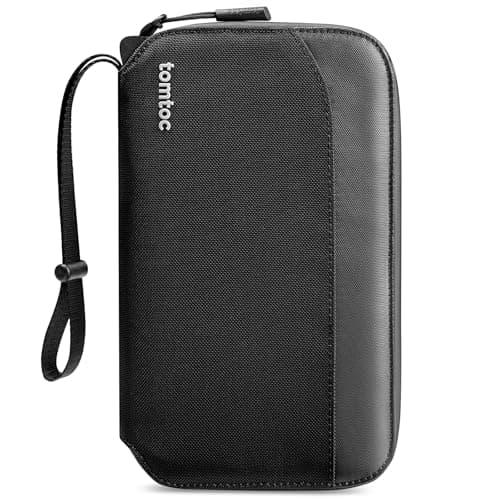
The pick when you are carrying other people's identities as well as your own, which is the version of this problem that actually keeps people awake. tomtoc lists a family passport holder at 9.45 x 5.12 x 1.18 in, 0.45 lb, with four passport slots plus an AirTag slot, in 840D Cordura with a waterproof zipper. Four labelled slots means you hand the right passport to the right person rather than fanning four identical booklets at a desk. The AirTag slot is the honest version of security: it does not stop the holder being lost, it means you find out where it is.

Best for a family
9.0
$35.99Amazon
03
Eagle Creek Eagle Creek Stash RFID Passport Wallet
Eagle Creek Stash RFID Passport Wallet

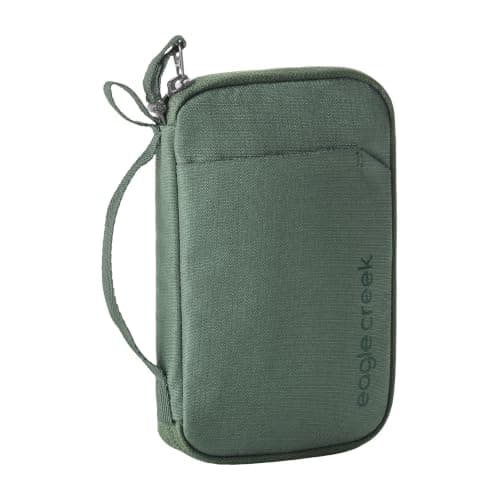
The pick if your system is already digital and the only physical documents left are a passport and one card. Eagle Creek lists the Stash RFID passport wallet at 6.5 x 4.25 x 0.75 in, 0.13 lb, water-resistant with RFID blocking. At an eighth of a pound it is the lightest document container in our catalog by a wide margin, and 0.75 in thick means it genuinely goes in a jacket pocket rather than a bag. Water resistance matters more on a document wallet than on almost anything else you carry: a soaked passport is a consular appointment.

Best minimal option
7.8
$39.00Amazon

#ad · Live prices from the Amazon Product API, as of October 10, 2026. Where we have no verified live price we show none — a gap beats a rotted number.

In detail

The picks, in full

01
ZOPPEN ZOPPEN Passport Holder Travel Wallet (Ver.5)

Best for a solo traveler

ZOPPEN Passport Holder Travel Wallet (Ver.5)

7.8 x 4.7 x 1.0 in0.44 lb7 card slots + passport pocketPU leather, RFID, wrist strap
8.4/10
Value: —

The pick for one person's documents, and the reason is the layout rather than the price. ZOPPEN lists the Ver.5 at 7.8 x 4.7 x 1.0 in, 0.44 lb, in PU leather with seven card slots, a passport pocket, RFID blocking and a wrist strap. Seven card slots is the number that matters - it holds the passport, the licence, two bank cards, a transit card, an insurance card and a boarding pass without anything living loose. The wrist strap is the quiet feature: a wallet you can hold on your wrist at a check-in desk is a wallet you do not put down on the desk and walk away from.

Fits the documents
9
Reachability
9
Durability
7
Loss resistance
8
Value
9

Pros

  • 7 card slots plus a passport pocket, per the listing - every identity document in one layout
  • 7.8 x 4.7 x 1.0 in and 0.44 lb, per the listing: pocketable rather than briefcase-sized
  • Wrist strap, which is the single best defence against leaving it on a counter

Cons

  • One passport pocket - this is not a family wallet
  • RFID blocking is claimed, with no independent test published; treat it as a free extra

Don't buy this if…

…you are travelling with children. One passport pocket is the whole limitation, and the tomtoc holder below exists for that.

$13.99View on Amazon

Price as of October 10, 2026. Prices change — Amazon's at checkout is the one that counts.

#ad · we may earn a commission from this link to ZOPPEN Passport Holder Travel Wallet (Ver.5)

02
tomtoc tomtoc Family Passport Holder with AirTag Slot

Best for a family

tomtoc Family Passport Holder with AirTag Slot

9.45 x 5.12 x 1.18 in0.45 lb4 passport slots + AirTag slot840D Cordura, waterproof zipper
9.0/10
Value: —

The pick when you are carrying other people's identities as well as your own, which is the version of this problem that actually keeps people awake. tomtoc lists a family passport holder at 9.45 x 5.12 x 1.18 in, 0.45 lb, with four passport slots plus an AirTag slot, in 840D Cordura with a waterproof zipper. Four labelled slots means you hand the right passport to the right person rather than fanning four identical booklets at a desk. The AirTag slot is the honest version of security: it does not stop the holder being lost, it means you find out where it is.

Fits the documents
10
Reachability
7
Durability
10
Loss resistance
10
Value
8

Pros

  • 4 passport slots plus an AirTag slot, per the listing - a found-again document wallet
  • 840D Cordura with a waterproof zipper, per the listing: the most robust shell here
  • 9.45 x 5.12 x 1.18 in at 0.45 lb - family capacity without family bulk

Cons

  • Too big for a trouser pocket; this lives in a personal item, not on your person
  • The AirTag is sold separately and the slot does nothing without one

Don't buy this if…

…you travel alone. Four slots of unused capacity is just a larger wallet to carry.

$35.99View on Amazon

Price as of October 10, 2026. Prices change — Amazon's at checkout is the one that counts.

#ad · we may earn a commission from this link to tomtoc Family Passport Holder with AirTag Slot

03
Eagle Creek Eagle Creek Stash RFID Passport Wallet

Best minimal option

Eagle Creek Stash RFID Passport Wallet

6.5 x 4.25 x 0.75 in0.13 lbWater-resistantRFID blocking
7.8/10
Value: —

The pick if your system is already digital and the only physical documents left are a passport and one card. Eagle Creek lists the Stash RFID passport wallet at 6.5 x 4.25 x 0.75 in, 0.13 lb, water-resistant with RFID blocking. At an eighth of a pound it is the lightest document container in our catalog by a wide margin, and 0.75 in thick means it genuinely goes in a jacket pocket rather than a bag. Water resistance matters more on a document wallet than on almost anything else you carry: a soaked passport is a consular appointment.

Fits the documents
6
Reachability
10
Durability
9
Loss resistance
6
Value
8

Pros

  • 0.13 lb and 0.75 in thick, per the listing - the lightest and slimmest here, pocketable for real
  • Water-resistant, per the listing, which is the failure mode that actually ruins a passport
  • Eagle Creek construction and warranty on a container you will carry for years

Cons

  • Minimal capacity - a passport, a card or two, and nothing else
  • No strap, no tracker slot, no itinerary sleeve

Don't buy this if…

…you still carry paper boarding passes, insurance documents and a vaccination card. The ZOPPEN has the slots for them.

$39.00View on Amazon

Price as of October 10, 2026. Prices change — Amazon's at checkout is the one that counts.

#ad · we may earn a commission from this link to Eagle Creek Stash RFID Passport Wallet

How we picked

We haven't tested these on a plane — and we say so

Every site in this category says it tested twenty cubes. We haven't tested any. We compiled the published manufacturer specs, computed the numbers that decide the buy — capacity, compression, cost per cube — and scored each set against a published rubric. The scores are judgments from documented research, not measurements we took. Where a figure came from a manufacturer's spec sheet we name it in Sources. Prices are pulled live from Amazon.

Questions

Frequently asked

What is the best way to organize travel documents?

Split them in two. Identity documents - passport, ID, trusted traveler card, visas - go in one dedicated wallet that lives in the same place all trip and never in checked baggage. Itinerary documents - boarding passes, bookings, vouchers - live on your phone with the first day printed, in a reachable outer pocket. Then photograph everything and store the photos both offline and in the cloud.

Should travel documents go in a carry-on or checked bag?

Carry-on, always, and ideally in your personal item or on your person. A checked bag is out of your control from the moment it leaves the desk, and a passport in a checked bag that gets delayed is a trip that stops. The same applies to medication and valuables.

What ID does TSA accept at the checkpoint?

TSA requires adult passengers 18 and older to show valid identification and publishes the acceptable list, which includes REAL ID-compliant state licences and ID cards, enhanced licences, certain approved mobile driving licences, US passports and passport cards, DHS trusted traveler cards, DoD IDs, permanent resident cards and several others. A temporary driving licence is not accepted. TSA states that the list can change without notice, so check it before each trip rather than relying on this summary.

Do I need a paper copy of my boarding pass?

Not usually, but printing the first day is worth it anyway. A phone at two percent in a queue, an airline app that will not load on airport wifi, or a gate agent with a broken scanner are all ordinary occurrences. Printing the first flight and the first night's hotel address removes all three failure modes for the cost of two sheets of paper.

Is RFID blocking in a travel wallet worth paying for?

It is not worth choosing a wallet for. Nearly every travel wallet on the market claims it, very few name the standard they block to, and none of the listings we have read publishes an independent test. Choose on passport pockets, card slots, water resistance and whether it has a strap, and take the RFID claim as an unverifiable extra.

What should I do if my passport is lost or stolen abroad?

Contact the nearest embassy or consulate of your own country immediately - that is the only route to an emergency replacement, and the process is much faster if you can produce a photo of the data page and your travel dates. Which is the whole argument for the backup step: the photograph is not for convenience, it is for the worst day of the trip.

Keep reading

Receipts

Sources & how we got these numbers

We do not run a testing lab, and we do not pretend to. Every dimension, capacity and compression figure traces to the manufacturer's own spec or listing; prices come live from Amazon. Where we couldn't verify something, we say so on the page rather than quietly leaving it out. Read our full method.